Viewing video over the web happens in 2 basic ways a) Streaming Media and b) Download Mode.
a) Streaming Media is like YouTube. You go onto a web page and the video clip plays directly within that webpage whilst the file "streams" from the originating place where the site is stored. This means that as soon as you click on the page you can start viewing the clip but the quality will be limited and if you have a slow connection (or the web is busy) the clip keeps pausing until enough has streamed through. Also you cannot view the clip unless you are connected to the web.
b) Download Mode is the way I have organised video on this site. When you click on a link the video file is downloaded and stored on YOUR computer. When this is complete your computer will select the right software and play the clip. Advantages are that you can have high quality video even if you have a slow connection and that you can view the files at leisure again without having to connect to the web, you can edit, organise the clips to suit you. Big disadvantage is that you can't see the clip until it is completely downloaded to your computer and for a large clip this can be quite a long time. Bear in mind that unless you specify a file location for the video the computer will store the video clips in a temporary internet folder on your computer that you will have to know how to get access to if you wanted to view the clips later. To do this you RIGHT CLICK instead of left click on the links and then a box will come up and then you can specify a name for the file and where you want to store it. For detailed instructions look below.
I have used 6 different video file formats and I have used small video samples that you can click on to see which files work on your computer. I have put some info about each file type below.
| No 1 and No 2 MPEG 1 low quality and MPEG 1 high quality | Both of these formats are identical apart from the quality level and of course the high quality files are nearly twice as big. This format is the most universal, edits very easily and should play on anything that plays video including older computers that have Windows 95, any DVD player etc. But file size is very large in relation to quality. |
| Item No 3 DVD | This is a DVD compliant MPEG 2 file. It should play on any computer with Windows XP onwards but not on Windows ME, 98 etc. Don't know about Apple M'. Superb quality and the file can be used to create DVD compilations. However the files are really large. |
| Item No 4 - RealOne player format | Fuelled by the longstanding rivalry between Apple M' and Microsoft (of course creating mutually incompatible video formats) a consortium of companies got together calling themselves the Helix community and created a player called the RealOne player. You can get it free and provided that you are careful not to allow yourself to agree to everything they want (ie when installing the player be careful to examine each box and UNCHECK each item if you don't feel happy agreeing to it) the conditions on having it are not too bad. I have found that the file size is by far the best in terms of quality. A player called Windows Media player is the player that comes along with any Windows installation as part of the operating system. This won't play the RealOne format. |
| Item No 5 - Quick Time format | This format is designed for Apple Mac players. So of course it will play on any Apple Mac computer. But Apple Mac have a player called Quick Time player that you can get for free. As with the Real One player you have to be careful not to allow yourself to agree to tedious things on condition of installing this. Also the Quick Time player tends to appear as an add on on most video software packages. So when you install the video software you may find that you are prompted to install this player as well. So you may have this player on your computer without realising it. This format won't play on the Windows Media player (this is part of any Windows operating system) but if you don't have this and you have the RealOne player this will play this format. As this is a specialist video format size to quality is very good. |
| Item No 6 -Windows Media player format | This format is designed for the Windows Media player. This comes along with any Windows operating system. Your computer is most likely to be either Windows or Apple Mac. So if you have Windows you'll have this player. If you have an Apple Mac I don't know if this format will play. Size to quality ratio is not so good, so although the quality is very good of the files that I have used, the size is very large. |
At the end of these General Instructions I have tried to look at the various issues to do with playing video clips as these are quite complex.
DETAILED INSTRUCTIONS FOR DOWNLOADING CLIPS
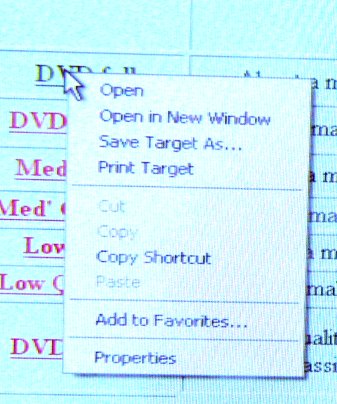
1- Right click on underlined clip. You should get this box showing
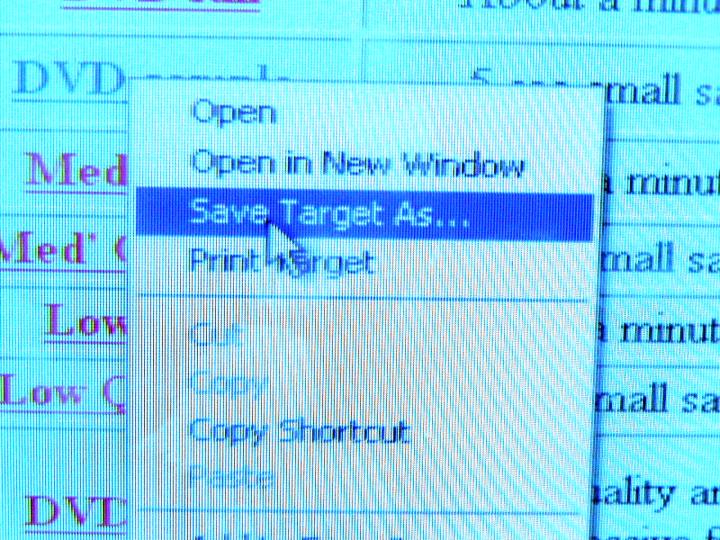
2- Highlight the 3rd item "Save Target As..." and click it
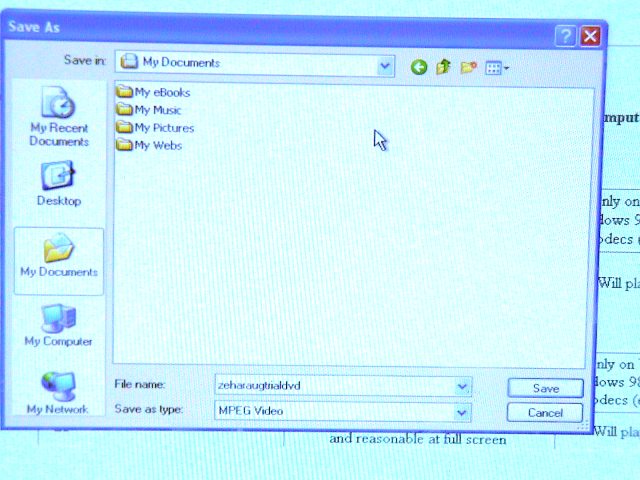
3 - Then this box appears. Usually "My Documents" appears next to "Save as" but you can find a different folder if you want to by clicking on the arrow to the right hand end of the "Save in" sub box. The File name will be the one used in the web site but you can change it if you want. Otherwise leave it as it is. I always start the file name with zehara. It will appear at the end of a long file list and you can type in "zehara" into the search function facility should you forget where the file has been saved to. This search function comes up as one item on the "START" menu on the bottom left corner of your screen.
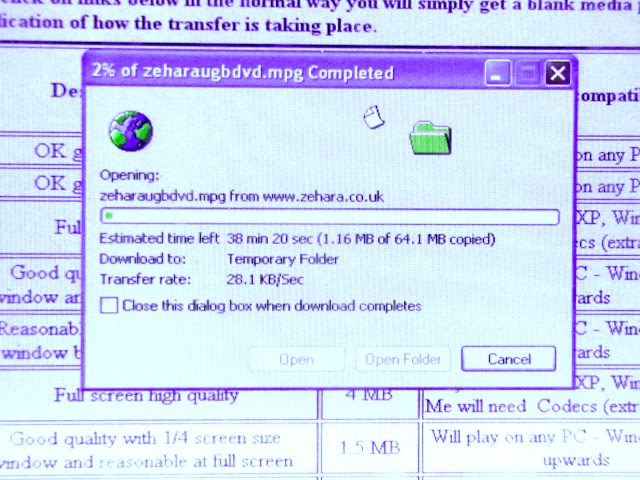
4 - Click on "Save" and go off and make a cup of coffee or go out even. If your computer is not a very recent one then I would suggest making sure that the transfer is complete - log off the internet and then play the clip by navigating to the folder where the clip is and clicking on it. An appropriate bit of software will come up and play the clip. This will take at least 20 secs or so.
SIZE MATTERS!
You may have found out that anything to do with video and computers is fraught with endless problems. When it comes to word processing everything is nice and easy, files come up quickly - save OK and the same goes for pictures, they may be a bit slower but generally everything goes as it should do. E Mail generally works fine. But not video. Quality is generally terrible from the internet, everything takes ages - there seems to be a multitude of similar looking media players and file names and extensions. Computer lock ups and problems abound.
This is because there is such a massive difference in size between things like word processing stuff, accounts, spreadsheets then pictures, then sound files and finally video.
Computers work in digital code, a sort of "Morse code" if you like. A small text file is around 2,000 characters, A spreadsheet is likewise loads of numbers and formulae but even a large spreadsheet will only have a several thousand rows each with characters so you are not likely to go further than a few million characters.
Pictures consist of fine dots of colour and each square inch on the screen will be about 100 x 100 dots - that's 10,000 dots so a full screen will be some 8 million dots. So even big pictures won't go much above 20 or 30 million characters.
Sound is an odd one. Digital sound is where the sound wave is turned into a computer code. But the human ear is so fine that you need 44,000 units per second, so a minute of music at CD quality will be nearly 3 million units, a full CD will be nearly 700 million units.
Now with video you are making a massive leap forward in size. Smooth video consists of 25 separate pictures PER SECOND ( for PAL video) and then you have the sound track. A DVD standard full screen picture of the clip used is around 8 million characters, so a SECOND of video will be 200 million characters and then 44,000 units for the sound track. So a full minute of video will be about 12,000 million characters for the picture alone. In reality though these sorts of size could not be coped with at all, in other words just 10 mins will completely fill up a really large hard disc or on a CD you would get just over 3 seconds of video.
What happens is that the picture information is compressed or summarised down. If you were to look at a video "frame by frame" you will notice that each frame is very similar to the one before it and often (especially if the video is filmed from a tripod) the bulk of the picture is exactly the same apart from the moving subject shifting a tiny bit. There are very many other aspects that can be similarly summarised - large patches of the same colour can be summed down by describing the area with a formula rather than quoting thousands of dots that are all the same. All the different aspects are summarised down by mathematical formulae called Algorithms so like the Enigma Code the playback software must be able to decode the video to get the original video and that is an awesome task. At least 20 separate Algorithms are involved, all these must work simultaneously to decode the video and it only takes one of these to be slightly faulty and the video will not play back correctly if at all. A DVD compressed video is about 1 million units per second. So these Algorithms have summed down the video from around 200 million down to just 1 million units per second of video and then the play back software must reverse this process so you can see the sheer scale of the problem.
FORMAT WARS
Unfortunately really huge egos are involved all the way. Those of Sony, Microsoft, Phillips, Apple Mac + all the huge record companies + other fry trying to get a piece of the action. It would be really lovely if the video format ie the way the video is compressed was to be standardised across the world so like a music CD or cassette tape you can take that anywhere in the world and it will play. The widespread use of MP3's and extensive copying of music has caused the record companies to panic and dig their heels in. Meanwhile the world domination of Microsoft has sharpened the resolve of Apple Mac to keep in there by keeping their own formats. Meanwhile the Helix community - a collection of companies working together and responsible for the Real One player have been successful in just about keeping one step ahead of Microsoft regarding their media players. So to rub it in they bring out video file formats that don't work on the Microsoft players. Then Apple Mac hit back by bringing out their own player called Quick Time! Using their vast experience in graphics they load this player with features that the other 2 can't hope to match. So it ends up with 3 different players and of course 3 different sets of video file formats being involved.
DVD TO THE RESCUE
DVD can mean 3 different things.
1 - the players, stand a lone ones and computer with DVD drives,
2 - The discs which are the same size as music CDs but a bit heavier
3 - The organisation of movie files called a DVD volume. This is the "content" of a movie DVD. This actually is a very complex organisation of files and it was not thought technically even possible at all till very recently. It allows for some 3 hours of high quality video on one disc and loads of other fancy and clever features along with complex anti piracy encryption. Of course software soon appeared that could by pass this but then interesting legal test cases actually made this software illegal which was to some extent surprising as this software was designed to make private legitimate copies of DVDs for private use in the same way that you would create backups of your music or software discs and the legality of this is in practical terms been OK as long as these are for your own private use. In the same way as a crowbar can be used for house breaking does not make it illegal to sell but nevertheless the top courts went heavily against the distribution of this software.
So I think this has hastened on the rapid rise of the DVD standard to the ridiculous extent that you can get DVD players in England for £15 new ( August 04) So just overnight it looks as if the DVD will now become the universal video standard. There is regional coding but that is a bit of software that exists within the playback device that picks up a code that is written on the DVD and if it is the wrong code then to refuse to play the DVD. Of course "multi region" players exist and seem to be freely available. Along with the glossy ordinary literature you will get a extra bit of paper that will indicate what illogical sequence of buttons to press that will cause the DVD player to ignore the regional code and therefore play any DVD. This is because of the dubious legality of this practice but as yet there has not been a test case against it.
This is good news at least for us because at least I can host DVD files that can be then put onto a DVD disc and play on any DVD player or any computer that has a DVD reader (which nowadays all of them have) and play them anywhere in the world. But of course the DVD files are enormous - around 1 MB per second of video. But I do think that Dance is one of those things that really is let down badly by poor quality video. For a start you lose the 3 D aspects especially of Belly dance as the whole thing is seen on a flat screen rather than stereoscopic vision which it would be live. So good quality playback can at least roughly get back all the finer detail that is completely lost on the lower quality formats.